Find the code that hides failures before production does
DiagScope reads your Java and Kotlin source and reports code that silently destroys diagnostic evidence — swallowed exceptions, missing transactions, HTTP calls without timeouts. Run it in your Maven build, let your AI assistant run it, or use it on its own. Nothing leaves your machine.
A Maven plugin runs DiagScope during mvn verify and fails the build by the tolerance you chose. It is on Maven Central: no repository to add, and nothing else to install.
Add it to the POM
One plugin entry. With no gate configured it only reports, so you can adopt it first and tighten later.
Maven runs on JDK 17 or newer. In a multi-module build each module is judged on its own, pom modules are skipped, and one diagscope.yml at the root governs them all. The analyzer comes with the plugin: one download of about 78 MB, cached afterwards.
With AI assistants
Let your coding assistant check its own work
When a team generates code with an assistant, DiagScope can run before the assistant says it is done, so swallowed errors and missing logs are fixed in the same session instead of in production.
Set it up once
Writes a short instruction block into AGENTS.md and CLAUDE.md, and adds a Claude Code hook that scans the changed files when a task ends. Existing content is never overwritten.
$diagscope init-agent
Output made for assistants
Compact plain text, worst finding first, a fix line for each. About 3 KB where the Markdown report has 22 KB. The exit code still comes from your gate.
Tolerance lives in diagscope.yml, so it is reviewed with the code. Fail on high-confidence errors, tolerate a few warnings, or define a stricter profile for release branches.
The automatic hook is for Claude Code. Other assistants read the instructions in AGENTS.md and run the same command, but nothing forces them to. A scan takes 1 to 15 seconds depending on project size, so the check runs when the task ends, not after every edit. The assistant is told not to silence a finding without asking you.
Standalone
No dependency in your project
The same analyzer runs on its own. Use it when your company does not want a build plugin, when the build is Gradle, or to look at a repository you do not own. Nothing is added to the project.
Install
Homebrew brings Java 17 with it. Without Homebrew, download the JAR and run it on Java 17 or newer.
$brew tap DiagScope/tap$brew install diagscope
Scan a project
No build step. REST endpoints, Kafka listeners and scheduled jobs are found as entrypoints; reports land in target/diagscope or build/diagscope.
$diagscope scan --project .
CI gate — only new findings
Fail the build only on findings introduced in this pull request, and leave the existing ones for later.
The full description, why it matters and how to fix it; the catalog lists every rule with its severity, category and version.
$diagscope explain SILENT_CATCH$diagscope rules
What it finds
Code that fails silently
Exceptions, transactions, concurrency, Kafka, performance, security, and more. Every finding names the entrypoint that reaches the problem.
SILENT_CATCH
Swallowed exception
Caught and never logged or re-thrown — the failure simply disappears.
FUTURE_GET_WITHOUT_TIMEOUT
Blocking call without timeout
A thread hangs indefinitely waiting for a result that may never come.
MISSING_TRANSACTION_ANNOTATION
Write without transaction
If a later step fails, the first write is committed and cannot be rolled back.
HTTP_TIMEOUT_NOT_SET
HTTP call with no timeout
A slow upstream exhausts the thread pool and takes the whole service down.
N_PLUS_ONE_QUERY_RISK
N+1 query in loop
A database call inside a loop — scales linearly and degrades with data growth.
KAFKA_SEND_RESULT_IGNORED
Kafka send not observed
The publish result is dropped — failures are invisible to the caller.
Report
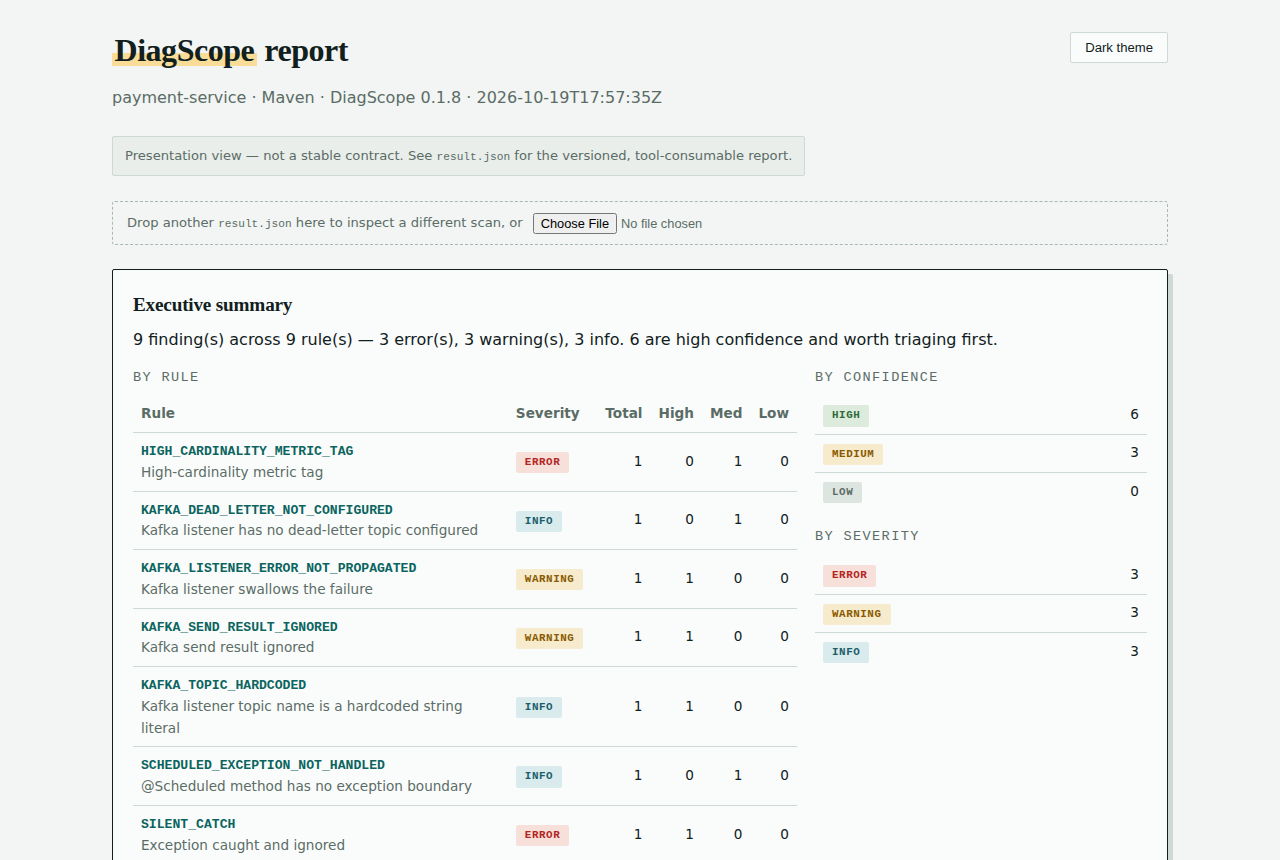
What the report looks like
Open report.html in any browser. It is one self-contained file: no server, no network. It ranks what to fix first, filters by severity and confidence, and shows the call path from the entrypoint to each finding.